Legacy Documentation
Desktop And Mini DBA Server
Legacy Documentation Home
alerts
analysisservicesalerts
analysisservicescpu
analysisservicesdashboard
analysisservicesdatabases
analysisservicesio
analysisservicessessions
azurealerts
azuredatabase
azuredatabasehealthcheck
azureindexes
azurelocks
azure security
azuresessions
azuresql
azuresqldatabase
azuresqldatabasedashboard
azuresqldatabases
azure sql server dashboard
azuretables
azurewaits
compare performance baseline
connections
cpu
custom sql server alerts
database
database query performance
databases
defaulttrace
dm exec query statistics xml
documentation
errorlog
files
gettingstarted
healthcheck database
healthcheck sql server
history active
history blocking
history data storage
history deadlocks
history files
history memory
history viewer
history waits
howtoperformancetuneazuresqldatabase
how to performance tune sql server
how to sql server performance tuning
how to sql server query tuning
indexes
Installation
io
License Support
locks
maintenance windows
options
performance history
security
server
servergettingstarted
Server Installation
server memory
serveroptions
serversecurity
servertroubleshooting
sql database memory
sql execution plan
sql extended event sessions
sql server activity
sql server alert configuration
sql server alerts
sql server database
sql server execution plan view
sql server index defrag jobs
sqlserverindexfragmentation
sql server index fragmentation
sql server index maintenance
sql server live query statistics
sqlserverqueryperformance
sql server query performance
sql server send slack alerts
sql server send teams alerts
sql server transaction log
sql server wait statistics
tables
tranlog
waits
webmonitorconfigure
webmonitorconnections
webmonitorcurrent
webmonitorcustom
webmonitorenterprise
webmonitorgettingstarted
webmonitorhistoric
webmonitorinstallation
webmonitorio
webmonitormemory
webmonitoroptions
webmonitoroverview
webmonitorsecurity
webmonitorwaits
wmi
The error log is only viewable if the credentials used to connect to the instance are in the SysAdmin or SecurityAdmin roles or explicitly have exec granted on the xp_readerrorlog function.
E.g. "GRANT EXEC ON xp_readerrorlog TO your username"
The search box at the top of the screen can be used to search for specific text withing the error log.
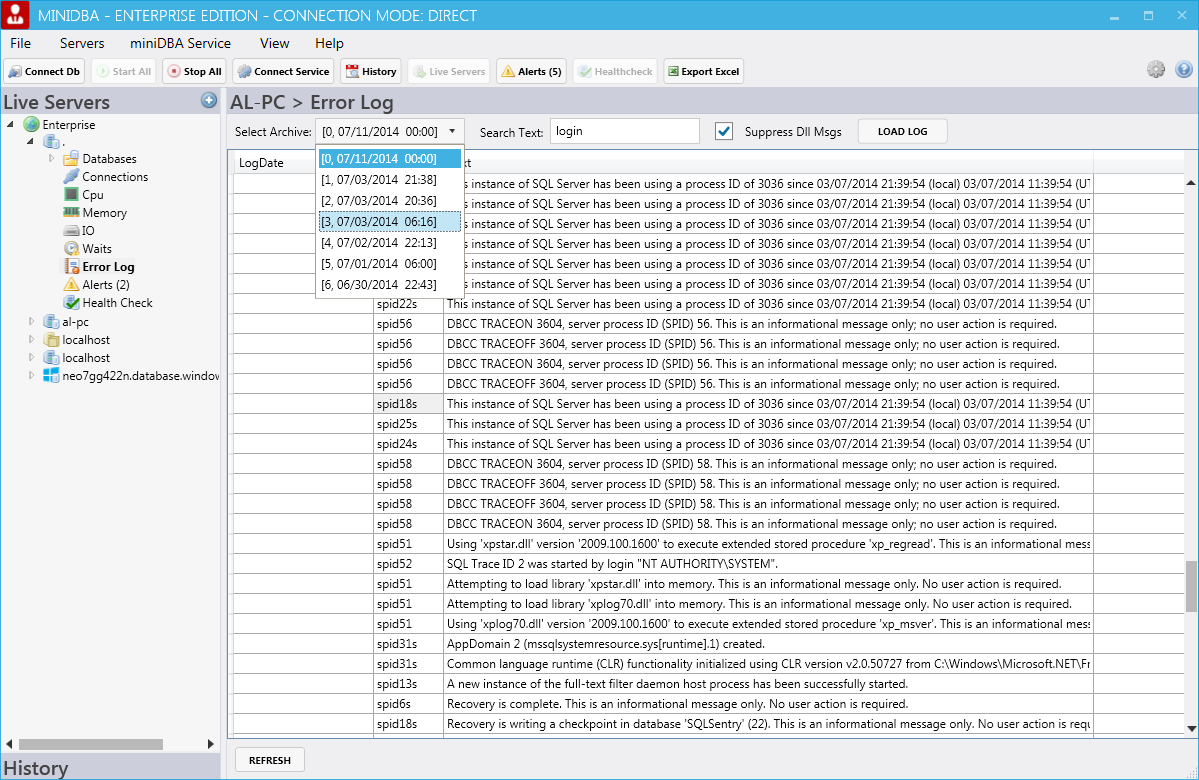
The screen shot above shows the latest archive selected with the 'Supress Dll Messages' option turned off, so dbghelp.dll information messages are being displayed. Select that option to hide them.
On servers earlier than 2012 SP1, entries in the sql server error log will occur every minute "Using dbghelp.dll version 4.0.5". This is a purely informational message of the lowest priority that is issued whenever SQL Server's extended events are queried.
Mini DBA does this once per minute to check for deadlocks. The message can be safely ignored or eliminated when upgrading to 2012 SP1.
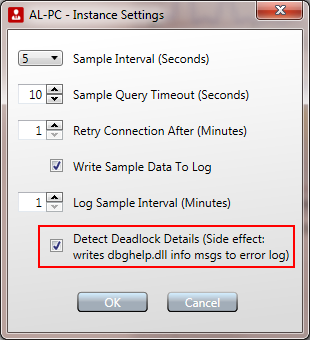
Turning the option to detect deadlock details off will get rid of these information messages but the history view will no longer contain the xml that represents deadlock details.
The deadlock graph will continue to display when deadlocks occur though (just the details are not gathered).
E.g. "GRANT EXEC ON xp_readerrorlog TO your username"
The search box at the top of the screen can be used to search for specific text withing the error log.
The screen shot above shows the latest archive selected with the 'Supress Dll Messages' option turned off, so dbghelp.dll information messages are being displayed. Select that option to hide them.
On servers earlier than 2012 SP1, entries in the sql server error log will occur every minute "Using dbghelp.dll version 4.0.5". This is a purely informational message of the lowest priority that is issued whenever SQL Server's extended events are queried.
Mini DBA does this once per minute to check for deadlocks. The message can be safely ignored or eliminated when upgrading to 2012 SP1.
Turning the option to detect deadlock details off will get rid of these information messages but the history view will no longer contain the xml that represents deadlock details.
The deadlock graph will continue to display when deadlocks occur though (just the details are not gathered).