The Servers page is where you add, review, and manage database servers monitored by Mini DBA. Each configured server belongs to a connected Mini DBA Engine and uses the engine to collect metrics and run monitoring checks.
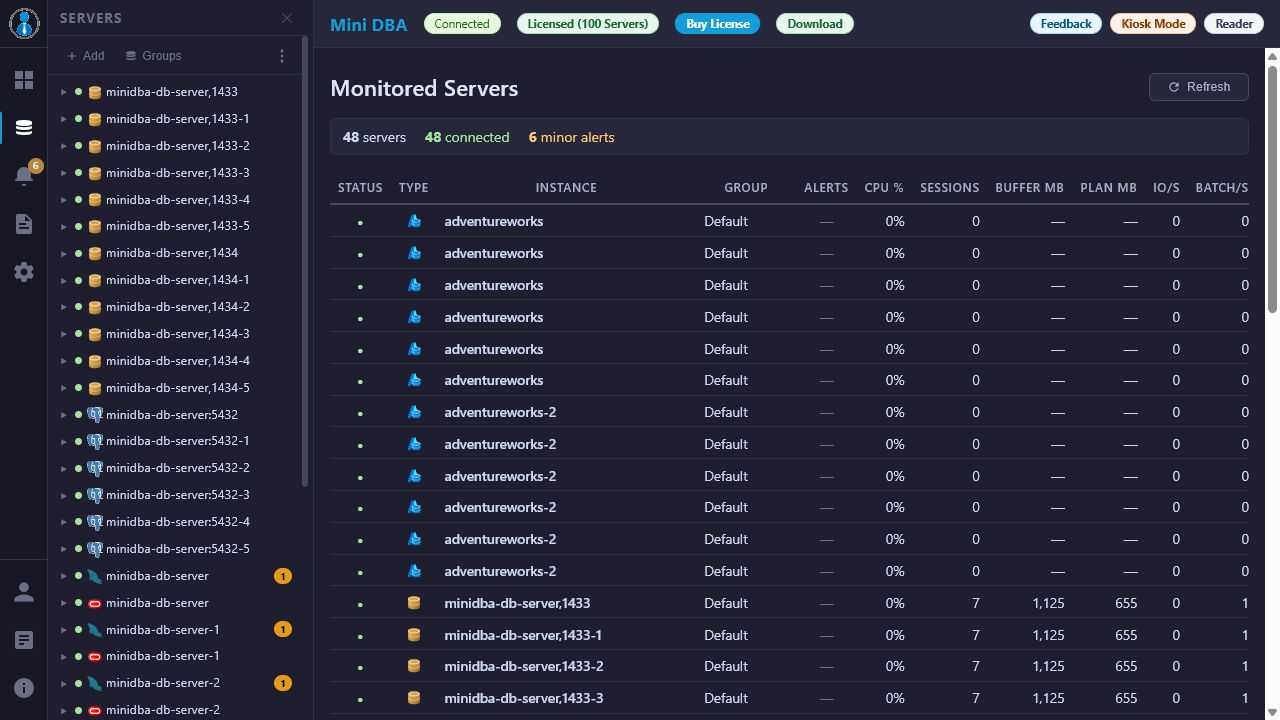
Servers page features
Use the Servers page to:
- Add SQL Server, Azure SQL, PostgreSQL, MySQL, MariaDB, and Oracle connections.
- Review monitored server configuration.
- Confirm which servers count against engine license limits.
- Remove or edit server definitions.
- Check whether monitoring is active for a server.
Add a database server
- Confirm the console is connected to the correct Mini DBA Engine in Settings.
- Open Servers.
- Choose the database platform.
- Enter the server name, connection endpoint, authentication details, and any platform-specific options.
- Test the connection where available.
- Save the server.
- Open the server from the navigation tree to confirm data is being collected.
Server tree groups
The left Servers panel includes a toolbar at the top of the tree. Use Groups to toggle between the flat server list and the grouped server tree when server group data is available. Group headings can be expanded or collapsed so large estates are easier to scan.
When grouped view is active, the Edit link beside Groups opens Server Groups Settings. Use it to create groups, assign monitored servers, manage group users, and enable explicit group membership where your deployment needs group-based access control. For the broader workflow, see Server Groups.
Server context menu
Right-click a server in the tree to open actions for that monitored server. Depending on the server type and your permissions, the context menu can include History, Permissions, Connectivity Log, Connection Info, Start / Stop Sampling, and Disconnect.
Use Connectivity Log when a server connects intermittently, a page is missing data, or you need the per-server database connection error history from the Mini DBA Engine.
Licensing and server limits
Mini DBA Engine licensing controls how many monitored database server connections can run. If the engine reports a license limit has been reached, reduce the monitored server count, deactivate unused server definitions, or upgrade the engine license from Licensing.
Best practices
- Use clear display names that match operational naming conventions.
- Put servers into server groups for easier navigation and reporting.
- Use the tree Groups button to review grouped navigation after assigning servers.
- Use least-privilege database credentials that can read monitoring views.
- Document which team owns each monitored server.
- Check Service Log after adding a server if data does not appear.
Server onboarding tips
Before adding a production server, confirm the engine can reach the database endpoint, the monitoring login has the required permissions, and host OS login is configured if you need operating system metrics. Use the platform-specific connection guides for SQL examples and permission notes.
After saving a server, open the new server page and confirm that activity, health, and platform-specific pages populate. If only some pages have data, the connection may work while permissions are still incomplete.
Servers FAQ
Which Engine monitors a server?
The selected connected Mini DBA Engine monitors the server. Confirm the engine before adding or editing server definitions.
Why does a server connect but show little data?
The login may have enough access to connect but not enough access to read monitoring views.
Do monitored servers affect licensing?
Yes. Engine licensing controls monitored server limits for the selected engine.
Related pages
- Connect database servers
- Server Groups
- Connectivity Log
- Troubleshoot database connectivity
- SQL Server monitoring
- Azure SQL monitoring
- PostgreSQL monitoring
- MySQL and MariaDB monitoring
- Oracle monitoring