Mini DBA Oracle monitoring provides pages for activity, databases, queries, waits, memory, health checks, Data Guard, alert log diagnostics, alerts, and performance tuning for monitored Oracle servers.
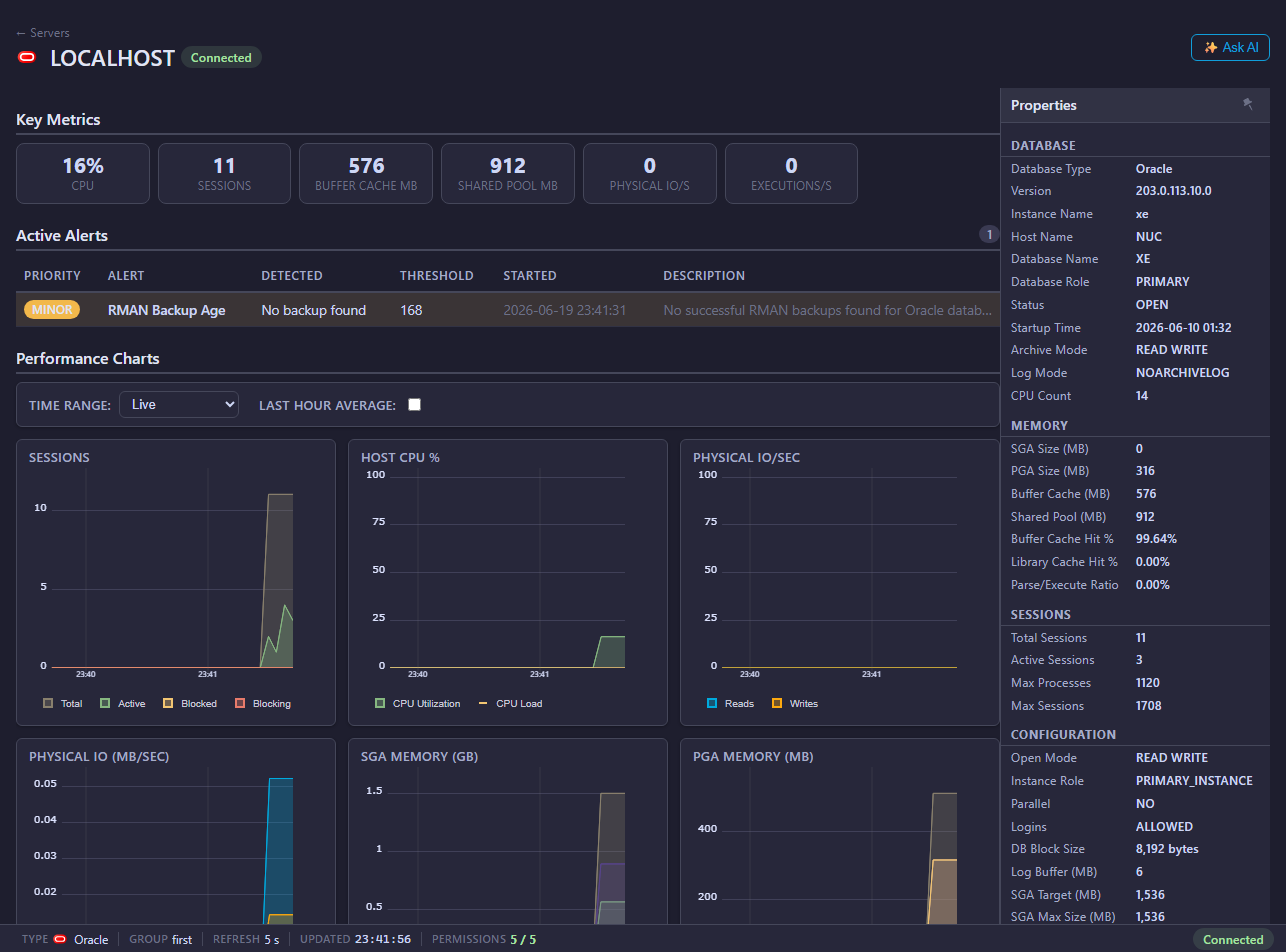
Oracle pages
- Connection and permissions
- Activity
- Databases
- Queries
- Query Analysis
- Execution Plans
- Plan History
- Waits
- Memory
- Storage and Tablespaces
- Operations
- Backup and Jobs
- Data Guard
- Health Checks
- Alert Log
- Performance Tune
- Alerts
Common investigation flow
- Start with Activity for live workload.
- Use Query Analysis for expensive SQL, historical samples, regressions, and query search.
- Use Oracle Execution Plans and Oracle Plan History to review current plans, plan changes, operator cost, rows, bytes, and predicates.
- Use Waits and Memory to identify bottlenecks.
- Use Storage and Tablespaces, Operations, Backup and Jobs, Health Checks, and Performance Tune for recoverability, capacity, configuration, and recommendation evidence.
Live and historical overview data
The Oracle overview charts include the Mini DBA Time Range selector. Use Live for current push updates, or switch to Last Hour, Last 12 Hours, Last Day, Last Week, or Custom to review collected history. Mini DBA loads and caches the selected historical dataset for the current console session and server context, so moving between overview charts, activity, waits, and other historical views stays quick after the range has loaded. Use Back to Live to resume live updates, then select another historical range when you need a different point-in-time view.
What Oracle monitoring helps answer
Oracle monitoring in Mini DBA helps teams answer:
- Which Oracle sessions are active and what are they waiting on?
- Which SQL statements are expensive or recurring?
- Did a SQL statement regress, change plan, or run near a schema change?
- Are waits pointing to I/O, CPU, locking, concurrency, or memory symptoms?
- Is Oracle memory pressure contributing to poor response time?
- Is Data Guard lag, destination status, or managed recovery state threatening recovery point or failover readiness?
- Are RMAN backups, Scheduler jobs, FRA space, archive destinations, and redo log switches healthy?
- Are recent ORA errors, warnings, or background process failures appearing in the alert log?
- Are health checks finding configuration, capacity, or operational risks?
- In multitenant systems, can the monitoring user see the required containers and pluggable databases?
Oracle monitoring relies on database privileges for performance views and dictionary views. For Oracle 12c+ multitenant environments, connect Mini DBA to the CDB/root service with a common C## user when you want full instance monitoring from one connection. This is the recommended setup for self-managed Oracle because it lets Mini DBA see CDB/root operational evidence such as RMAN backup history, redo log switch history, Flash Recovery Area information, and visible PDB/container metadata. If the CDB is not accessible, add each PDB service separately with a PDB-local monitoring user, accepting that some Operations and container-level data may be unavailable.
Permissions and Oracle licensing awareness
Use Oracle connection and permissions to create the monitoring user. The core privileges are CREATE SESSION and SELECT ANY DICTIONARY, adjusted to your organization's security policy. Avoid the DBA role for routine monitoring unless your policy explicitly permits it.
Some Oracle views and features can be associated with optional Oracle packs or license terms outside Mini DBA. Confirm your Oracle licensing position for AWR, ASH, Diagnostics Pack, or Tuning Pack related workflows before enabling or relying on those features.
Oracle monitoring FAQ
Is DBA required for Mini DBA Oracle monitoring?
No. DBA is powerful and should generally be avoided for routine monitoring. The connection guide shows narrower privileges.
Should I create a common user?
For Oracle 12c+ multitenant systems, a common C## monitoring user is recommended when Mini DBA needs CDB and PDB visibility from one connection. The Oracle service name should point to the CDB/root service for self-managed multitenant systems. This is better for Mini DBA than a PDB-local login when you want backup/recovery, redo, FRA, and container discovery data. Use individual PDB services where CDB access is unavailable or deliberately out of scope.
Does host OS login matter for Oracle?
Yes when you need host CPU and drive metrics alongside Oracle activity, waits, memory, and query data. Use Host OS Login where direct OS access is available.
Can Mini DBA help tune Oracle SQL?
Mini DBA provides activity, query, wait, memory, health, and performance tuning pages. Use them to identify candidate SQL and resource symptoms before applying changes through your Oracle change process.
Related pages
- Connect database servers
- Oracle connection and permissions
- Oracle execution plans
- Oracle operations
- Host OS login
- Alerts
- Reports