Mini DBA SQL Server monitoring gives DBAs a server-level view of activity, cached SQL, Query Store, CPU, memory, waits, files, drives, jobs, availability groups, health checks, alerts, and database detail.
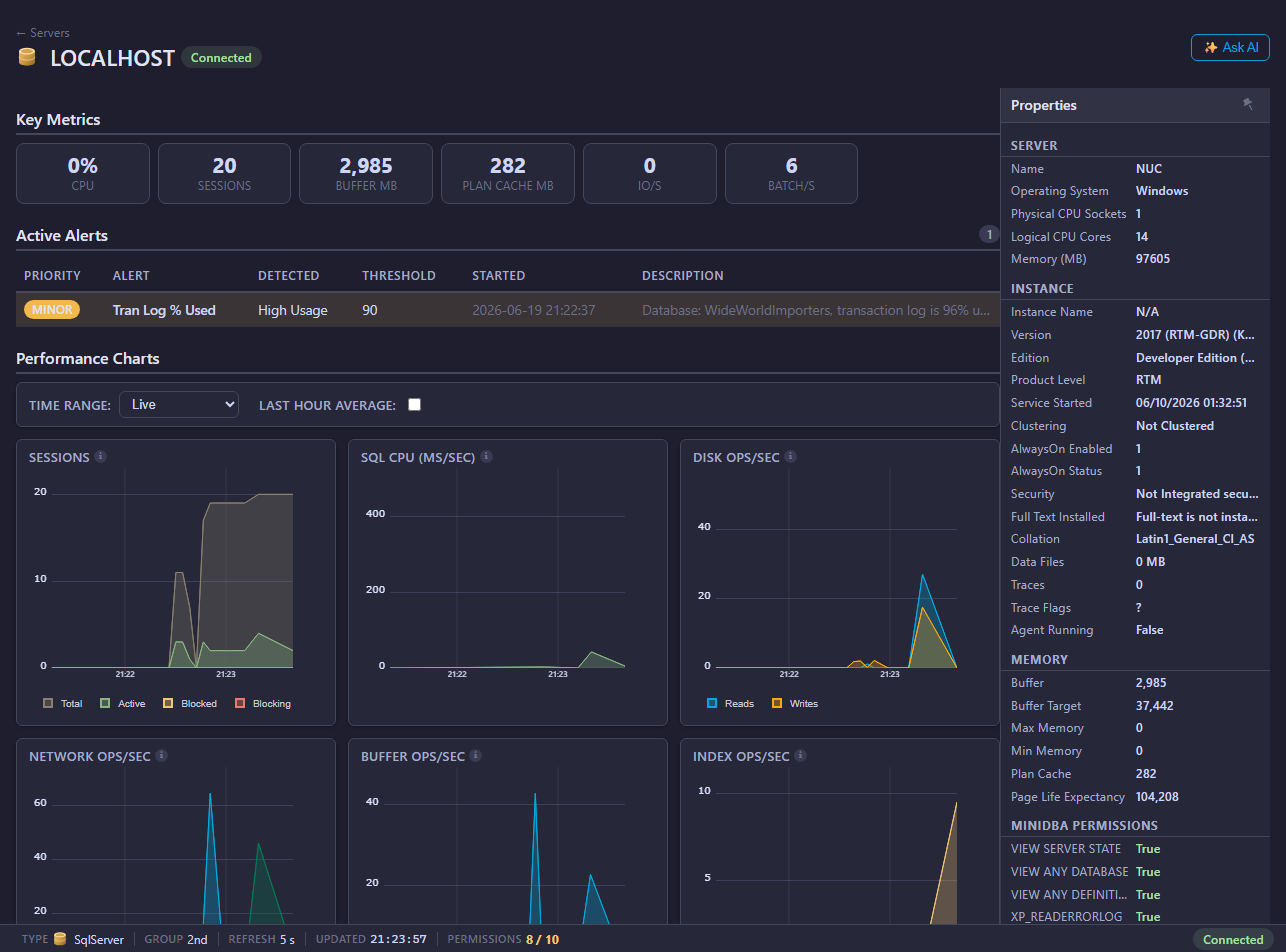
Open a SQL Server
- Connect a Mini DBA Engine in Settings.
- Create a monitoring login using SQL Server connection and permissions.
- Add or confirm the SQL Server on the Servers page.
- Expand the SQL Server in the navigation tree.
- Select the server name or one of its child pages.
What SQL Server monitoring helps answer
SQL Server monitoring in Mini DBA is designed to answer operational questions quickly:
- What is running on SQL Server right now?
- Which sessions are blocked or blocking others?
- Which queries are consuming the most CPU, reads, writes, or duration?
- Are waits pointing to CPU, memory, I/O, locking, or parallelism pressure?
- Are database files, drives, or logs approaching capacity?
- Did a SQL Server Agent job fail?
- Are Always On Availability Groups healthy?
- Are there configuration or maintenance issues found by health checks?
Because the console connects live activity, historical query evidence, Query Store, waits, files, and health checks, DBAs can move from symptom to supporting evidence without jumping between many unrelated tools.
SQL Server pages
- Activity
- Profiler
- Cached SQL
- Query Store
- Execution Plans
- CPU
- Memory
- Drives
- Files
- Waits
- Deadlocks
- Health Checks
- Performance Tune
- Error Log
- Agent Jobs
- Always On
- Logins
- Alerts
- Databases
Common investigation flow
- Start with Activity for live sessions, blocking, and workload.
- Use Waits to identify bottleneck categories.
- Use Cached SQL and Query Store to find expensive statements.
- Use SQL Server Execution Plans to drill into expensive operators and plan warnings.
- Use Memory, CPU, Drives, and Files for resource pressure.
- Use Health Checks and Performance Tune for recommendations.
Live and historical overview data
The SQL Server overview charts include the Mini DBA Time Range selector. Use Live for current push updates, or switch to Last Hour, Last 12 Hours, Last Day, Last Week, or Custom to review collected history. Mini DBA loads and caches the selected historical dataset for the current console session and server context, so moving between overview charts and related historical views stays quick after the range has loaded. Use Back to Live to resume live updates, then select another historical range when you need a different point-in-time view.
Permissions and data quality
Good SQL Server monitoring depends on the monitoring login. At minimum, most production deployments should grant VIEW SERVER STATE, VIEW ANY DATABASE, and VIEW ANY DEFINITION. Optional features such as SQL Server Agent job review, error log access, Extended Events profiler, and deadlock capture need extra permissions. Use SQL Server connection and permissions to create a least-privilege login.
If pages are empty or partial, check permissions before assuming the database is not producing data. Missing VIEW SERVER STATE can make activity, waits, CPU, memory, and query pages weak. Missing VIEW ANY DEFINITION can hide object and file context. Missing msdb job access can hide Agent job information.
SQL Server monitoring FAQ
Does Mini DBA replace SQL Server management studio?
No. Mini DBA is for monitoring, alerting, diagnostics, and operational visibility. SSMS remains the administration tool for many direct configuration and query-editing tasks.
Can Mini DBA monitor SQL Server Always On?
Yes. The Always On page shows availability group, replica, and database synchronization health where SQL Server exposes that data.
Can Mini DBA show Query Store data?
Yes, when Query Store is supported and enabled. Use SQL Server Query Store for server-level analysis and SQL Server Database Query Store for database-specific analysis.
Why are host OS metrics different from SQL Server metrics?
SQL Server DMVs describe SQL Server workload and some host state. Host OS metrics describe the underlying machine. Use both when investigating CPU, memory, drive, or disk I/O pressure. On Windows SQL Server hosts, WMI setup can add CPU core and process context.
Related pages
- Connect database servers
- SQL Server connection and permissions
- Enable WMI for SQL Server monitoring
- SQL Server execution plans
- Licensing
- Alerts